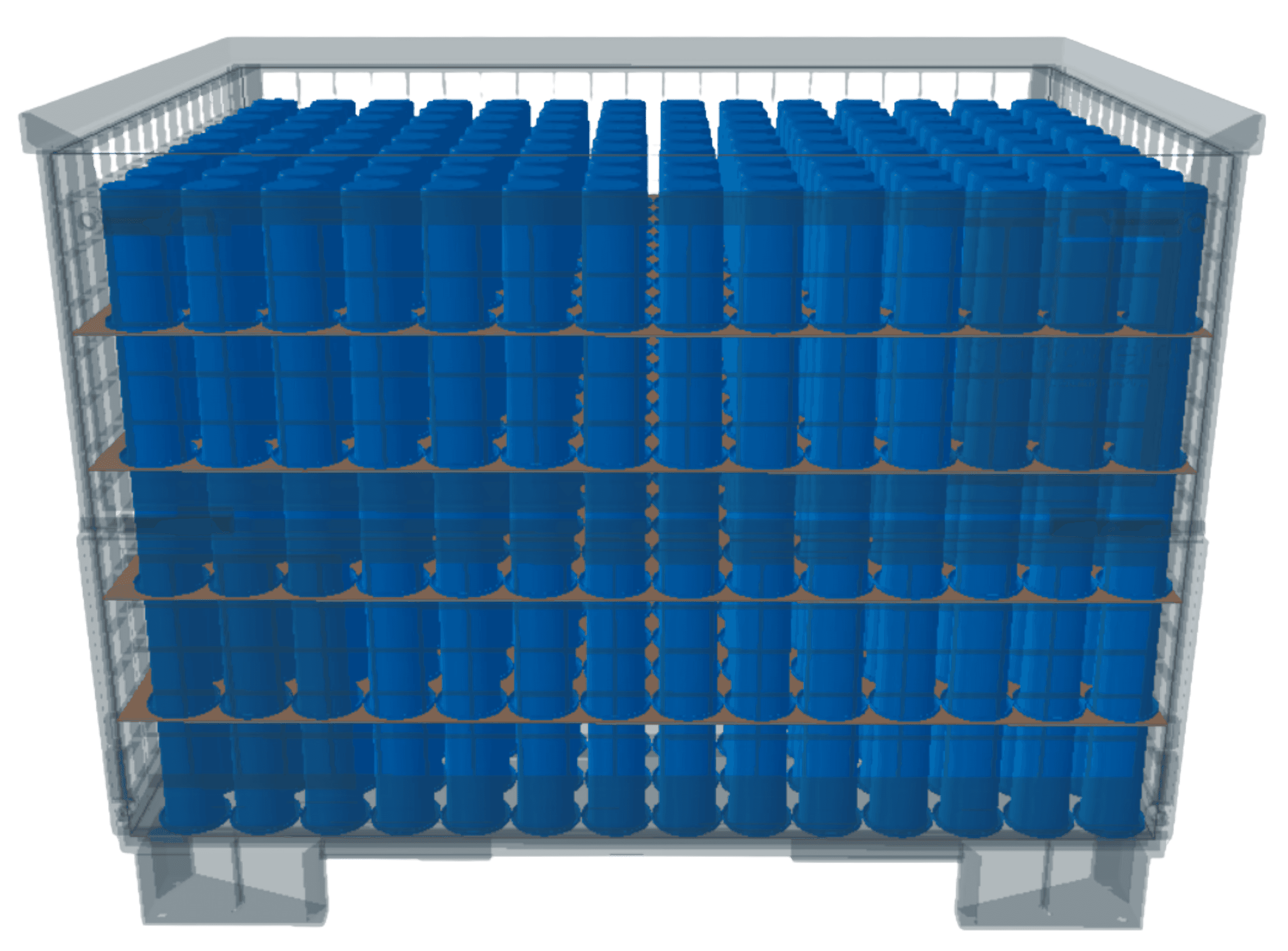
Select the perfect simulation mode tailored to your specific packaging and logistics optimization needs.
No installation required
No installation required
Learn it in 15 minutes
Learn it in 15 minutes
No CAD expertise required
No CAD expertise required
Smart Fill
Upload parts, select container, get quantity.
Workflow Steps
1
Upload CAD DataSTEP, OBJ, STL
2
Select Container and RequirementsStandard or custom sizes
3
Choose Packing Method and SimulateBulk, layers, stacking, etc.
4
Get ResultsSimulate estimated fit quantity
Best For:
Freight cost calculation
Packaging feasibility checks
Capacity checks
How many parts fit into a container?
Smart Select
Upload parts, set quantity, find ideal container.
Workflow Steps
1
Upload CAD DataSTEP, OBJ, STL
2
Specify Quantity and RequirementsEnter part quantity to transport
3
Simulate many different containersAnalyzes ideal container match and hierarchy
4
Compare OptionsReview utilization & metrics
Best For:
Packaging planning
Volume optimization
Best-fit container selection
Most economical transport method?
Unique in the world
Smart Stack
Define boxes, get quantity.
Workflow Steps
1
Select Inner Containere.g. Folding box, Euro container
2
Select Outer Containere.g. Pallet, master carton
3
Simulate Container PackingCalculates best arrangement
4
Get ResultsTotal containers fit
Best For:
Pallet loading
Distribution centers
Multi-box shipments
How many boxes fit into the large box?
Explainer Video
--:--
Six Packing Methods for Every Packaging Application
Six Packing Methods for Every Packaging Application
Six Packing Methods for Every Packaging Application
Choose from 6 Packing Methods
Choose the optimal packing strategy for your parts – from high-density bulk packing to precision compartment organization.
Bulk Packing
Use more container volume with less packaging effort
Load robust parts loosely into the container and use the available space without complex inserts or fixed packing patterns. Pakera shows how many parts fit, how the total weight develops and whether bulk packing remains practical within your defined limits.
Rigid Layers
Make every pack stable, repeatable and easy to standardize
Arrange parts in clearly defined, fixed layers so operators can reproduce the same packing pattern every time. Rigid layers create predictable part positions and a controlled process from initial packing to line-side removal.
Flexible Layers
Reduce empty space without losing a structured pack
Adapt the arrangement within each layer to the actual part geometry. Flexible layers help use irregular shapes more efficiently while keeping the load ordered and easier to handle than loose bulk packing.
Stacking
Turn available height into more parts per container
Stack compatible parts vertically to use container height instead of leaving valuable volume unused. Pakera helps evaluate capacity, orientation, weight and stack constraints before the concept moves into physical testing.
Compartments
Give every sensitive part its own protected position
Place each component in a separate cell to reduce movement, contact and mix-ups during handling and transport. Compartment packing creates a highly repeatable packaging standard when protection and process reliability matter more than maximum fill density.
Paired Parts
Keep matching components together from packing to assembly
Arrange two corresponding parts as one defined packing unit, such as left-hand and right-hand variants. This reduces searching, sorting and picking effort while making production-side handling more intuitive.
Six Packing Methods for Every Industry Packaging Application - Cartonization made easy
Six Packing Methods for Every Industry Packaging Application - Cartonization made easy
Six Packing Methods for Every Industry Packaging Application - Cartonization made easy
Find out what you can use the 6 packaging methods for
Depending on the part and the application, some packaging methods are more suitable than others.
Bulk
Bulk
Maximum space utilization
Maximum space utilization
Highest packing density of robust parts
Highest packing density of robust parts
Cost-effective shipping of C-parts
Cost-effective shipping of C-parts
Fastest handling for large quantities
Fastest handling for large quantities
Reduced packing materials
Reduced packing materials
Rigid Layers
Rigid Layers
Organize parts in structured layers
Organize parts in structured layers
Perfect for fragile items (A, B and C)
Perfect for fragile items (A, B and C)
Easy unpacking process
Easy unpacking process
Minimal part damage risk
Minimal part damage risk
Organized inventory management
Organized inventory management
Flexible Layers
Flexible Layers
Adaptive layer arrangement
Adaptive layer arrangement
Optimized space efficiency (A, B and C)
Optimized space efficiency (A, B and C)
Accommodates varying part sizes
Accommodates varying part sizes
Balanced protection and density
Balanced protection and density
Reduced void spaces
Reduced void spaces
Paired Parts
Paired Parts
Arrangement of related parts
Arrangement of related parts
Ideal for matching components
Ideal for matching components
Simplified sorting and assembly
Simplified sorting and assembly
Reduced handling of A- and B-parts
Reduced handling of A- and B-parts
Ideal for left/right or set components
Ideal for left/right or set components
Stacking
Stacking
Vertical space optimization
Vertical space optimization
Maximizes vertical space utilization
Maximizes vertical space utilization
Stable load distribution (A, B and C)
Stable load distribution (A, B and C)
Efficient warehouse utilization
Efficient warehouse utilization
Reduced floor space requirements
Reduced floor space requirements
Compartments
Compartments
Segregated organization
Segregated organization
Prevents part mixing of A- and B-parts
Prevents part mixing of A- and B-parts
Enhanced traceability
Enhanced traceability
Simplified picking process
Simplified picking process
Ideal for protecting high quality parts
Ideal for protecting high quality parts
Success Stories
Success Stories
Real-World Use Cases
Automotive Supplier
Uses Smart Select to automatically determine the most cost-effective container for new series components.
23% freight cost reduction
Mechanical Engineering
Uses Smart Fill to check how many castings fit into existing containers without exceeding load capacities.
18% reduction in excess weight
Packaging Planner
Uses Smart Select to compare packaging options for recurring parts in minutes instead of manual trial-and-error across spreadsheets, drawings and internal coordination.
84% faster packaging planning
E-Commerce Logistics
Uses Smart Stack to optimally arrange cartons on Euro and industrial pallets for shipping.
21% less pallets per order
Tier 1 Supplier
Simulates future series packaging early in the development stage, avoiding chaotic packaging changes.
9% faster time-to-market
Electronics Manufacturing
Uses Smart Fill to validate packaging concepts for sensitive serial parts before SOP.
94% fewer manual packing trials
Industrial Equipment
Uses Smart Select to compare container options for recurring components.
78% more standardization
Tier-1 Auto Supplier
Uses Smart Select to identify the most cost-efficient packaging concept.
36% freight cost reduction
Procurement
Uses Smart Select to compare packaging scenarios early and estimate impact.
Early cost transparency
Automotive Supplier
Uses Smart Select to automatically determine the most cost-effective container for new series components.
23% freight cost reduction
Mechanical Engineering
Uses Smart Fill to check how many castings fit into existing containers without exceeding load capacities.
18% reduction in excess weight
Packaging Planner
Uses Smart Select to compare packaging options for recurring parts in minutes instead of manual trial-and-error across spreadsheets, drawings and internal coordination.
84% faster packaging planning
E-Commerce Logistics
Uses Smart Stack to optimally arrange cartons on Euro and industrial pallets for shipping.
21% less pallets per order
Tier 1 Supplier
Simulates future series packaging early in the development stage, avoiding chaotic packaging changes.
9% faster time-to-market
Electronics Manufacturing
Uses Smart Fill to validate packaging concepts for sensitive serial parts before SOP.
94% fewer manual packing trials
Industrial Equipment
Uses Smart Select to compare container options for recurring components.
78% more standardization
Tier-1 Auto Supplier
Uses Smart Select to identify the most cost-efficient packaging concept.
36% freight cost reduction
Procurement
Uses Smart Select to compare packaging scenarios early and estimate impact.
Early cost transparency
Cartonization Core Features
Cartonization Core Features
3 Core Features
Secure & Encrypted
CAD File Upload
Upload a wide variety of CAD formats directly in your browser. Pakera simplifies, anonymizes and converts them into a neutral mesh file - original data is not stored.
• STEP, STL & OBJ
• Real-time file validation
• Drag & drop interface
Secure & Encrypted
CAD File Upload
Upload a wide variety of CAD formats directly in your browser. Pakera simplifies, anonymizes and converts them into a neutral mesh file - original data is not stored.
• STEP, STL & OBJ
• Real-time file validation
• Drag & drop interface
Next-Gen Packaging Optimization
Next generation algorithms analyze the geometry of your parts and automatically determine the most efficient packing arrangements, taking your requirements into account.
• Next-gen packing algorithm model
• Multi-level optimization
• Fast calculation times
Next-Gen Packaging Optimization
Next generation algorithms analyze the geometry of your parts and automatically determine the most efficient packing arrangements, taking your requirements into account.
• Next-gen packing algorithm model
• Multi-level optimization
• Fast calculation times
3D Visualization
Interactive 3D viewer to see your uploaded and simplified parts and optimized packing results in real-time. Review all packaging results easily in your browser.
• 360° rotation & zoom
• Cross-section views
• Exporting the packing visualizations
3D Visualization
Interactive 3D viewer to see your uploaded and simplified parts and optimized packing results in real-time. Review all packaging results easily in your browser.
• 360° rotation & zoom
• Cross-section views
• Exporting the packing visualizations
From CAD data to approval in one workflow.
Pakera brings simulation, evaluation, reporting and sharing into one connected process.
Explore the full capabilities of Pakera, designed to streamline your cartonization, palletization, logistics and packaging processes.
Technology & Security
Technology & Security
Next-Gen Optimization
Advanced optimization algorithms use CAD data to identify efficient packing configurations.
CAD based SaaS
Upload STEP, STL and OBJ files directly to the browser for instant simulation.
Highest Data Security
AES-256-GCM, TLS 1.3, Passkeys and MFA protect sensitive data on high-performance servers in Germany.
Data Classification
Control access to sensitive data through project-level classification and role-based permissions.
Cloud & On-Premise
Operated in our secure cloud as standard for highest performance, but can be installed locally (On-Premise) upon request.
Secure Browser based Simulation
Browser-based SaaS simulations eliminate local installations, reduce IT overhead, and enable instant access from any location.
Server Certifications
Enterprise-grade server security aligned with ISO 27001, ISO 27701, ISO 14001 and ISO 9001.
API & Integration
Custom system integrations and APIs are available upon request to fit your IT landscape.
Next-Gen Optimization
Advanced optimization algorithms use CAD data to identify efficient packing configurations.
CAD based SaaS
Upload STEP, STL and OBJ files directly to the browser for instant simulation.
Highest Data Security
AES-256-GCM, TLS 1.3, Passkeys and MFA protect sensitive data on high-performance servers in Germany.
Data Classification
Control access to sensitive data through project-level classification and role-based permissions.
Cloud & On-Premise
Operated in our secure cloud as standard for highest performance, but can be installed locally (On-Premise) upon request.
Secure Browser based Simulation
Browser-based SaaS simulations eliminate local installations, reduce IT overhead, and enable instant access from any location.
Server Certifications
Enterprise-grade server security aligned with ISO 27001, ISO 27701, ISO 14001 and ISO 9001.
API & Integration
Custom system integrations and APIs are available upon request to fit your IT landscape.
Next-Gen Optimization
Advanced optimization algorithms use CAD data to identify efficient packing configurations.
CAD based SaaS
Upload STEP, STL and OBJ files directly to the browser for instant simulation.
Highest Data Security
AES-256-GCM, TLS 1.3, Passkeys and MFA protect sensitive data on high-performance servers in Germany.
Data Classification
Control access to sensitive data through project-level classification and role-based permissions.
Cloud & On-Premise
Operated in our secure cloud as standard for highest performance, but can be installed locally (On-Premise) upon request.
Secure Browser based Simulation
Browser-based SaaS simulations eliminate local installations, reduce IT overhead, and enable instant access from any location.
Server Certifications
Enterprise-grade server security aligned with ISO 27001, ISO 27701, ISO 14001 and ISO 9001.
API & Integration
Custom system integrations and APIs are available upon request to fit your IT landscape.
Simulation & Packing
Simulation & Packing
3 Packing Modes
Smart Fill, Smart Select and Smart Stack – intelligent solutions for every packaging requirement.
6 Packing Methods
Choose from bulk goods, rigid layers, flexible layers, pairs, stacking and compartments.
Low & High Volume Simulation
Simulate packing scenarios from a single part up to 1.000.000 units – built for complex logistics and large-scale production planning.
Container Diversity
Choose from more than 180 standard containers, including euro container, folding boxes, pallet cartons, pallets, containers, and mesh boxes.
Individual Container
Define custom container types and reuse them across projects to ensure consistent packaging standards.
Flexible Alignment
Intuitively decide how parts are positioned and aligned within the container for custom packing.
3 Packing Modes
Smart Fill, Smart Select and Smart Stack – intelligent solutions for every packaging requirement.
6 Packing Methods
Choose from bulk goods, rigid layers, flexible layers, pairs, stacking and compartments.
Low & High Volume Simulation
Simulate packing scenarios from a single part up to 1.000.000 units – built for complex logistics and large-scale production planning.
Container Diversity
Choose from more than 180 standard containers, including euro container, folding boxes, pallet cartons, pallets, containers, and mesh boxes.
Individual Container
Define custom container types and reuse them across projects to ensure consistent packaging standards.
Flexible Alignment
Intuitively decide how parts are positioned and aligned within the container for custom packing.
3 Packing Modes
Smart Fill, Smart Select and Smart Stack – intelligent solutions for every packaging requirement.
6 Packing Methods
Choose from bulk goods, rigid layers, flexible layers, pairs, stacking and compartments.
Low & High Volume Simulation
Simulate packing scenarios from a single part up to 1.000.000 units – built for complex logistics and large-scale production planning.
Container Diversity
Choose from more than 180 standard containers, including euro container, folding boxes, pallet cartons, pallets, containers, and mesh boxes.
Individual Container
Define custom container types and reuse them across projects to ensure consistent packaging standards.
Flexible Alignment
Intuitively decide how parts are positioned and aligned within the container for custom packing.
Outstanding Simulation Features
Outstanding Simulation Features
Transport Protection
Include outer cartons, intermediate layers, cut protection, or wrapping (e.g., bubble wrap) in simulations.
Control Framework Conditions
Control parameters such as container type, dimensions, pallet height, and maximum gross weight for accurate results.
Container-in-Container
Take nesting, outer cartons, and loading units into account in the simulation.
Highest Simulation Accuracy
Pakera enables highly realistic packing simulations for confident and well-founded decision-making.
Transport Protection
Include outer cartons, intermediate layers, cut protection, or wrapping (e.g., bubble wrap) in simulations.
Control Framework Conditions
Control parameters such as container type, dimensions, pallet height, and maximum gross weight for accurate results.
Container-in-Container
Take nesting, outer cartons, and loading units into account in the simulation.
Highest Simulation Accuracy
Pakera enables highly realistic packing simulations for confident and well-founded decision-making.
Transport Protection
Include outer cartons, intermediate layers, cut protection, or wrapping (e.g., bubble wrap) in simulations.
Control Framework Conditions
Control parameters such as container type, dimensions, pallet height, and maximum gross weight for accurate results.
Container-in-Container
Take nesting, outer cartons, and loading units into account in the simulation.
Highest Simulation Accuracy
Pakera enables highly realistic packing simulations for confident and well-founded decision-making.
Weight & Cost Analysis
Weight & Cost Analysis
Smart Part Weight Calculation
Estimate part weight based on material density. Choose from around 250 standard materials in our library.
Smart Gross Weight Calculation
Estimate gross weight based on part weight and estimated packaging weight for the chosen container.
Freight Volume Calculation
Automatically calculates the freight volume of the digital packed container.
Freight Cost Calculation
Automatically determines if physical or volumetric weight applies. Calculates freight costs per part based on your individual freight rates.
Smart Part Weight Calculation
Estimate part weight based on material density. Choose from around 250 standard materials in our library.
Smart Gross Weight Calculation
Estimate gross weight based on part weight and estimated packaging weight for the chosen container.
Freight Volume Calculation
Automatically calculates the freight volume of the digital packed container.
Freight Cost Calculation
Automatically determines if physical or volumetric weight applies. Calculates freight costs per part based on your individual freight rates.
Smart Part Weight Calculation
Estimate part weight based on material density. Choose from around 250 standard materials in our library.
Smart Gross Weight Calculation
Estimate gross weight based on part weight and estimated packaging weight for the chosen container.
Freight Volume Calculation
Automatically calculates the freight volume of the digital packed container.
Freight Cost Calculation
Automatically determines if physical or volumetric weight applies. Calculates freight costs per part based on your individual freight rates.
8 Smart Checks
8 Smart Checks
Chargeable Weight Check
Chargeable weight is calculated to support more accurate shipping estimates.
Container Load Check
Checks whether the total load stays within the allowed limits of the selected container.
Operator Safety Check
Checks whether the packaging setup supports safe and ergonomic manual handling.
Transport Safety Check
Checks whether the packaging design can be transported using typical modes of transport.
Warehouse Safety Check
Checks whether the packaging design complies with the permissible limits and can be used with standard storage systems.
Plausibility check
Checks whether the simulation result is realistic and falls within the expected range of results.
Transport Efficiency Check
Evaluates transport efficiency to help reduce empty space and avoidable shipping cost impact.
Sustainability Check
Assesses material efficiency, reusability, and overall environmental impact of the packaging concept.
Chargeable Weight Check
Chargeable weight is calculated to support more accurate shipping estimates.
Container Load Check
Checks whether the total load stays within the allowed limits of the selected container.
Operator Safety Check
Checks whether the packaging setup supports safe and ergonomic manual handling.
Transport Safety Check
Checks whether the packaging design can be transported using typical modes of transport.
Warehouse Safety Check
Checks whether the packaging design complies with the permissible limits and can be used with standard storage systems.
Plausibility check
Checks whether the simulation result is realistic and falls within the expected range of results.
Transport Efficiency Check
Evaluates transport efficiency to help reduce empty space and avoidable shipping cost impact.
Sustainability Check
Assesses material efficiency, reusability, and overall environmental impact of the packaging concept.
Chargeable Weight Check
Chargeable weight is calculated to support more accurate shipping estimates.
Container Load Check
Checks whether the total load stays within the allowed limits of the selected container.
Operator Safety Check
Checks whether the packaging setup supports safe and ergonomic manual handling.
Transport Safety Check
Checks whether the packaging design can be transported using typical modes of transport.
Warehouse Safety Check
Checks whether the packaging design complies with the permissible limits and can be used with standard storage systems.
Plausibility check
Checks whether the simulation result is realistic and falls within the expected range of results.
Transport Efficiency Check
Evaluates transport efficiency to help reduce empty space and avoidable shipping cost impact.
Sustainability Check
Assesses material efficiency, reusability, and overall environmental impact of the packaging concept.
Standardization and Workflow
Standardization and Workflow
Create Packaging Report
Automatically generate modular and precise packing instructions based on defined parameters and validated simulation results.
Editing Packing Instructions
Flexible editing options for packing instructions, aligned with your selected subscription plan.
Branding of Packing Instructions
Packing instructions can be branded with corporate logo and more.
Easy Sharing
Share packaging reports with internal and external partners instantly, even without an account. Share a secure link or PDF.
Approval Workflow (intern & extern)
Enable structured review and approval workflows for digital packing results, with transparent tracking and standardized collaboration across teams and partners.
Archiving
Archived simulations and projects remain accessible and editable at any time, with storage duration depending on your subscription plan.
Central Container Library
Create and manage custom container types for individual use or company-wide standardization.
Multi-User Collaboration
Work with multiple team members simultaneously, with real-time updates and version control.
Auto-Generate Packaging BOM
Automatically create a Bill of Materials for packaging material based on simulation results - no manual effort required.
Transport Route, Cost & Emissions
Calculate the optimal transport route, total transport costs, and CO₂ emissions - all in one step directly from your simulation.
PPWR
PPWR Documentation & Declaration of Conformity
Create PPWR documentation and your Declaration of Conformity easily with Pakera - directly from your simulation data.
PPWR ready
Create Packaging Report
Automatically generate modular and precise packing instructions based on defined parameters and validated simulation results.
Editing Packing Instructions
Flexible editing options for packing instructions, aligned with your selected subscription plan.
Branding of Packing Instructions
Packing instructions can be branded with corporate logo and more.
Easy Sharing
Share packaging reports with internal and external partners instantly, even without an account. Share a secure link or PDF.
Approval Workflow (intern & extern)
Enable structured review and approval workflows for digital packing results, with transparent tracking and standardized collaboration across teams and partners.
Archiving
Archived simulations and projects remain accessible and editable at any time, with storage duration depending on your subscription plan.
Central Container Library
Create and manage custom container types for individual use or company-wide standardization.
Multi-User Collaboration
Work with multiple team members simultaneously, with real-time updates and version control.
Auto-Generate Packaging BOM
Automatically create a Bill of Materials for packaging material based on simulation results - no manual effort required.
Transport Route, Cost & Emissions
Calculate the optimal transport route, total transport costs, and CO₂ emissions - all in one step directly from your simulation.
PPWR
PPWR Documentation & Declaration of Conformity
Create PPWR documentation and your Declaration of Conformity easily with Pakera - directly from your simulation data.
PPWR ready
Create Packaging Report
Automatically generate modular and precise packing instructions based on defined parameters and validated simulation results.
Editing Packing Instructions
Flexible editing options for packing instructions, aligned with your selected subscription plan.
Branding of Packing Instructions
Packing instructions can be branded with corporate logo and more.
Easy Sharing
Share packaging reports with internal and external partners instantly, even without an account. Share a secure link or PDF.
Approval Workflow (intern & extern)
Enable structured review and approval workflows for digital packing results, with transparent tracking and standardized collaboration across teams and partners.
Archiving
Archived simulations and projects remain accessible and editable at any time, with storage duration depending on your subscription plan.
Central Container Library
Create and manage custom container types for individual use or company-wide standardization.
Multi-User Collaboration
Work with multiple team members simultaneously, with real-time updates and version control.
Auto-Generate Packaging BOM
Automatically create a Bill of Materials for packaging material based on simulation results - no manual effort required.
Transport Route, Cost & Emissions
Calculate the optimal transport route, total transport costs, and CO₂ emissions - all in one step directly from your simulation.
PPWR
PPWR Documentation & Declaration of Conformity
Create PPWR documentation and your Declaration of Conformity easily with Pakera - directly from your simulation data.
PPWR ready
Integration & Usability
Integration & Usability
Realistic 3D Visualization
Interactive 3D packing result visualization directly in the browser for transparent tracing.
Easy Onboarding
With intuitive operation and free video tutorials, any user can start packaging simulations within minutes, without any simulation or CAD knowledge or technical background.
Pakera Onboarding Guarantee
Designed for simplicity. Anyone familiar with a computer and web browser can start running packing simulations within 3–15 minutes.
3-15 minutes to first simulation
No CAD Skill needed
No CAD or simulation expertise required – Pakera is designed so anyone can upload a file, run a simulation, and get reliable results within minutes.
Video Tutorials
Free video tutorials enable users to get started quickly, reduce onboarding time, and unlock the full value of the software without additional training costs.
Regular Live Webinars
Join our regular live webinars to deepen your knowledge, discover new features, and get practical insights directly from our experts.
Intuitive Dashboard & KPIs
Access project history, packing instructions, approval processes, utilization rates, fill rates, and other important metrics in one place.
Support
We are committed to providing outstanding customer support to ensure you achieve maximum value and success with Pakera.
Realistic 3D Visualization
Interactive 3D packing result visualization directly in the browser for transparent tracing.
Easy Onboarding
With intuitive operation and free video tutorials, any user can start packaging simulations within minutes, without any simulation or CAD knowledge or technical background.
Pakera Onboarding Guarantee
Designed for simplicity. Anyone familiar with a computer and web browser can start running packing simulations within 3–15 minutes.
3-15 minutes to first simulation
No CAD Skill needed
No CAD or simulation expertise required – Pakera is designed so anyone can upload a file, run a simulation, and get reliable results within minutes.
Video Tutorials
Free video tutorials enable users to get started quickly, reduce onboarding time, and unlock the full value of the software without additional training costs.
Regular Live Webinars
Join our regular live webinars to deepen your knowledge, discover new features, and get practical insights directly from our experts.
Intuitive Dashboard & KPIs
Access project history, packing instructions, approval processes, utilization rates, fill rates, and other important metrics in one place.
Support
We are committed to providing outstanding customer support to ensure you achieve maximum value and success with Pakera.
Realistic 3D Visualization
Interactive 3D packing result visualization directly in the browser for transparent tracing.
Easy Onboarding
With intuitive operation and free video tutorials, any user can start packaging simulations within minutes, without any simulation or CAD knowledge or technical background.
Pakera Onboarding Guarantee
Designed for simplicity. Anyone familiar with a computer and web browser can start running packing simulations within 3–15 minutes.
3-15 minutes to first simulation
No CAD Skill needed
No CAD or simulation expertise required – Pakera is designed so anyone can upload a file, run a simulation, and get reliable results within minutes.
Video Tutorials
Free video tutorials enable users to get started quickly, reduce onboarding time, and unlock the full value of the software without additional training costs.
Regular Live Webinars
Join our regular live webinars to deepen your knowledge, discover new features, and get practical insights directly from our experts.
Intuitive Dashboard & KPIs
Access project history, packing instructions, approval processes, utilization rates, fill rates, and other important metrics in one place.
Support
We are committed to providing outstanding customer support to ensure you achieve maximum value and success with Pakera.
Collaboration & Organization
Collaboration & Organization
Single User & Multi User
From small businesses to global enterprises – our single and multi-user accounts scale with your organization.
Team Management
Manage teams, roles, and permissions centrally to ensure structured collaboration, controlled access, and consistent packaging standards across your organization.
Multi-Client Management
Enterprise accounts enable centralized management of multiple locations and teams.
Standardize Container & Materials Libraries
Centrally managing containers and material data ensures standardized weight calculations, consistent packaging decisions, and comparable results across projects, teams, and locations.
Centralized Admin Control
Centrally manage users, roles, and permissions to maintain full control, ensure compliance, and enforce consistent standards across your organization.
Secure Role & Permission Management
Define precise roles and permissions to ensure secure access, clear responsibilities, and controlled collaboration across teams and projects.
Single Source of Truth
Keep teams aligned with one trusted source for packaging data, decisions, and communication.
Single User & Multi User
From small businesses to global enterprises – our single and multi-user accounts scale with your organization.
Team Management
Manage teams, roles, and permissions centrally to ensure structured collaboration, controlled access, and consistent packaging standards across your organization.
Multi-Client Management
Enterprise accounts enable centralized management of multiple locations and teams.
Standardize Container & Materials Libraries
Centrally managing containers and material data ensures standardized weight calculations, consistent packaging decisions, and comparable results across projects, teams, and locations.
Centralized Admin Control
Centrally manage users, roles, and permissions to maintain full control, ensure compliance, and enforce consistent standards across your organization.
Secure Role & Permission Management
Define precise roles and permissions to ensure secure access, clear responsibilities, and controlled collaboration across teams and projects.
Single Source of Truth
Keep teams aligned with one trusted source for packaging data, decisions, and communication.
Single User & Multi User
From small businesses to global enterprises – our single and multi-user accounts scale with your organization.
Team Management
Manage teams, roles, and permissions centrally to ensure structured collaboration, controlled access, and consistent packaging standards across your organization.
Multi-Client Management
Enterprise accounts enable centralized management of multiple locations and teams.
Standardize Container & Materials Libraries
Centrally managing containers and material data ensures standardized weight calculations, consistent packaging decisions, and comparable results across projects, teams, and locations.
Centralized Admin Control
Centrally manage users, roles, and permissions to maintain full control, ensure compliance, and enforce consistent standards across your organization.
Secure Role & Permission Management
Define precise roles and permissions to ensure secure access, clear responsibilities, and controlled collaboration across teams and projects.
Single Source of Truth
Keep teams aligned with one trusted source for packaging data, decisions, and communication.
Pakera’s Standard Material Library to speed up your work
Pakera’s Standard Material Library to speed up your work
Pakera’s Standard Material Library to speed up your work
Standard Material Library
Standard Material Library
Explore over 280 standard materials with pre-defined density values. Perfect for automatic part weight calculation when direct weight data is unavailable*.
Explore over 280 standard materials with pre-defined density values. Perfect for automatic part weight calculation when direct weight data is unavailable*.
* Weight calculations using our material library are based on stored, typical density values and represent a sound mathematical approximation. The actual component weight may vary slightly in individual cases due to individual material mixtures (e.g., additives, fiber content), moisture absorption, manufacturing and geometric tolerances, or internal cavities.
Pakera’s Standard Container Library to speed up your work
Pakera’s Standard Container Library to speed up your work
Pakera’s Standard Container Library to speed up your work
Standard Container Library
Standard Container Library
Explore over 180 standard containers for your cartonization and packing simulations. Choose from various packaging types optimized for different logistics scenarios.
Explore over 180 standard containers for your cartonization and packing simulations. Choose from various packaging types optimized for different logistics scenarios.
Advanced Analytics made easy
Advanced Analytics made easy
Advanced Packaging Analysis
Gain deep insights into your packaging efficiency with comprehensive analytics and reporting capabilities
Container Utilization Rate
Analyze how efficiently containers are packed and identify remaining empty space for optimization opportunities.
Logistics Cost Estimation
Calculate storage and freight costs per item using your individual freight rates for accurate cost projections.
Sustainability Analysis
Estimate CO₂e transport emissions to support environmental sustainability goals.
Gross Weight Verification
Check gross weights of freight to ensure compliance with handling and transport safety limits.
Packaging Method Comparison
Analyze and compare multiple packaging methods side-by-side to identify the most efficient solution.
Ideal Container Finder
Automatically identify the most efficient container for transporting components, optimizing space and cost.
Frequently Asked Questions
Can packaging reports and concepts be shared with customers, suppliers and other external stakeholders?
What happens to my CAD data?
Can we create packing instructions and packaging reports directly in Pakera?
What is cartonization software?
Can results be exported?
Which file formats and input data does Pakera support?
Is installation required?
What parameters does Pakera check automatically?
How accurate are the packing optimization results?
How does Pakera work?
How long does a simulation take, approximately?
How long does it take to get started with Pakera?
What exactly does Pakera help us do?
Ready to Transform Your Packaging Process?
Join many other companies already saving time and costs with Pakera's advanced simulation technology.